Payroll problems often appear on salary day.
But they usually start much earlier.
A missed attendance punch was never corrected.
A shift change was updated late.
Leave was approved after the attendance cutoff.
Overtime hours were entered but still waiting for approval.
A new employee’s salary structure was incomplete.
By the time payroll starts, HR is no longer calculating salary.
The team is reconstructing what happened during the month.
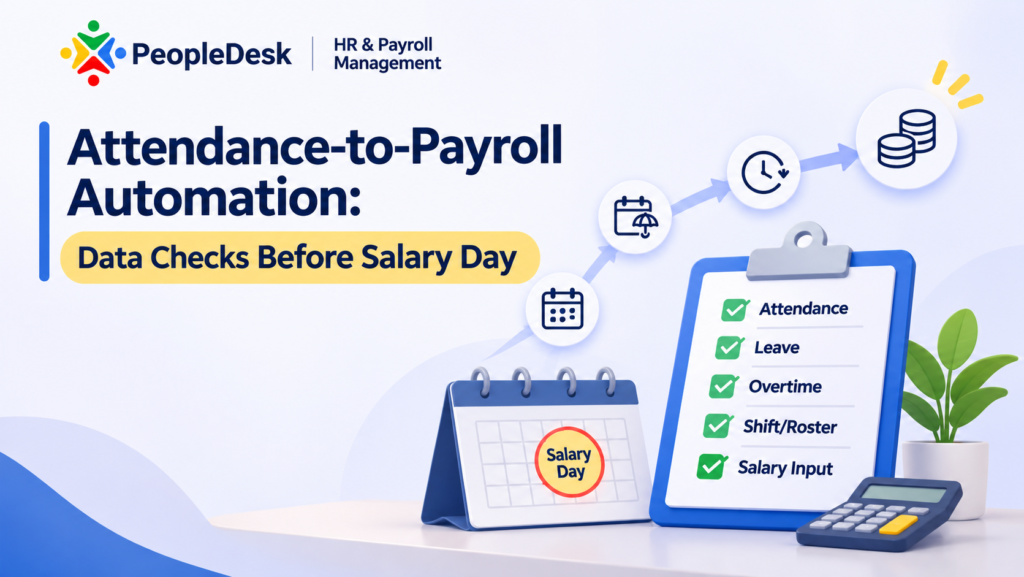
That is why attendance-to-payroll automation should not be treated as a button that moves attendance data into payroll.
It should be treated as a controlled data flow.
Before salary is calculated, HR and payroll should know that the attendance, leave, shift, overtime and employee records feeding payroll are complete enough to trust.
For HR heads, payroll teams and HR operations leaders in Bangladesh, the practical question is:
What should be checked before attendance data becomes payroll input?
These nine checks are a good place to start.
What Does Attendance-to-Payroll Automation Actually Mean?
Attendance-to-payroll automation means payroll-relevant workforce events flow from the HR and time system into salary processing without the team repeatedly rebuilding those inputs in spreadsheets.
A practical flow may look like this:
Employee Master → Shift / Roster → Attendance → Leave → Overtime → Adjustments → Attendance Close → Payroll Calculation → Approval → Payslip / Bank Advice
The important word is not automation.
It is controlled automation.
If incorrect attendance flows automatically into payroll, the business has not removed the problem.
It has only moved the wrong data faster.
SAP’s current payroll control guidance explicitly treats time and attendance, compensation, taxation and employee data as areas that should be validated before productive payroll. Oracle’s Time and Labor guidance follows a similar pattern: validate time entries, resolve exceptions, apply calculation rules and only then transfer the resulting time data for payroll processing.
For HR teams, the lesson is straightforward:
Salary day should not be the first time payroll data is checked.
Why Payroll Still Takes Time After Attendance Closes
Many organizations say attendance closes on the 25th or 26th of the month.
Yet payroll still takes several days.
Why?
Because “attendance closed” does not always mean “attendance ready for payroll.”
HR may still be checking:
- missing punches
- incorrect shift assignments
- late attendance corrections
- unapproved leave
- leave without pay
- overtime
- holiday or weekly-off treatment
- new joiners
- resignations
- salary changes
- allowances and deductions
This is where attendance-to-payroll automation either saves time or simply moves the reconciliation problem into another screen.
The goal should be to identify exceptions before payroll begins.
1. Verify the Active Employee Population
Before checking attendance, confirm who should actually be included in the payroll period.
This sounds obvious, but employee lifecycle changes can affect salary calculation.
Check employees who:
- joined during the month
- transferred between locations or departments
- changed grade or salary structure
- resigned
- entered final settlement
- went on long leave
- became inactive
- changed payroll group
For a new joiner, the system may need:
- joining date
- salary structure
- bank details
- tax-related information
- attendance start date
- shift assignment
- payroll eligibility
For a separating employee, the payroll treatment may be completely different.
A good attendance-to-payroll automation process starts with the correct employee population.
If HR is calculating attendance for someone who should not be in the payroll run, the error begins before salary calculation.
2. Resolve Missing Attendance Before Payroll Cutoff
Missing punches are one of the most common time-data exceptions.
An employee has an IN time but no OUT time.
Or no punch appears at all.
The system cannot confidently determine the employee’s attendance status without additional information or policy rules.
Before salary processing, review:
- missing IN punches
- missing OUT punches
- incomplete attendance days
- duplicate punches
- unusual working-hour records
- attendance device or mobile punch exceptions
These should not be silently converted into absence unless that is genuinely the organization’s approved policy.
Oracle’s current Time and Labor guidance specifically describes validation of time entries followed by manager resolution of identified exceptions before the data is transferred for payroll processing.
The principle applies regardless of software:
Resolve the exception before payroll consumes it.
3. Confirm Shift and Roster Assignments
Attendance cannot always be interpreted correctly without knowing the expected shift.
Consider an employee who punches in at 10:00 PM and leaves at 6:00 AM.
Without the correct night-shift assignment, the same attendance can be interpreted incorrectly.
Before payroll, verify:
- assigned shift
- roster changes
- weekly off
- holiday calendar
- temporary shift changes
- overnight shifts
- shift exchange where applicable
This becomes especially important for:
- factories
- hospitals
- retail operations
- security teams
- logistics
- customer service
- 24/7 operations
SAP’s time-evaluation documentation describes employee work schedules, absences, overtime and other time data being evaluated before payroll uses the resulting wage-related time information.
That is why shift accuracy is not simply an attendance issue.
It can become a payroll issue.
4. Close Attendance Adjustments
Attendance adjustments should have a clear cutoff.
Otherwise payroll can keep changing while HR is trying to finalize salary.
Review:
- pending adjustment requests
- approved corrections not yet reflected
- rejected adjustments
- manual corrections
- backdated attendance changes
Suppose an employee was marked absent on the 12th.
The employee submits a correction on the 25th.
The manager approves it on the 28th.
But payroll was calculated on the 27th.
Now HR either has to rerun payroll or correct the salary afterward.
A stronger process defines:
Attendance correction cutoff → Exception review → Attendance close → Payroll processing
That does not mean corrections can never happen later.
It means late corrections should become visible exceptions instead of silently changing an already reviewed payroll.
For a broader evaluation of connected HR workflows, see our HRM Software in Bangladesh: 7 Buying Checks for 2027.
5. Verify Leave and Leave Without Pay
Approved leave and payroll treatment are closely connected.
Before salary day, payroll should know:
- which leave requests were approved
- which were rejected
- which are still pending
- which leave types are paid
- whether any unpaid leave applies
- whether leave balances are sufficient
- whether backdated leave changed attendance
A simple leave issue can produce a salary dispute.
Imagine an employee takes approved leave.
Attendance still shows absence.
Payroll treats that day as unpaid.
The salary calculation may be mathematically correct based on the data it received.
The source data was wrong.
This is why attendance-to-payroll automation must connect leave and attendance before salary calculation.
The system should not force payroll staff to compare a leave spreadsheet with an attendance spreadsheet employee by employee.
6. Review Overtime Before Payroll
Overtime should not enter payroll simply because additional hours appear in attendance.
The business may need to verify:
- employee eligibility
- approved overtime hours
- overtime date
- applicable rate
- shift
- policy limits
- approver
- rejected or pending requests
For example:
Attendance shows an employee worked two extra hours.
That does not automatically prove those two hours qualify for payable overtime.
The organization may require supervisor approval.
The employee may not be eligible under company policy.
The extra time may come from an incorrect shift assignment.
A controlled attendance-to-payroll automation workflow therefore separates:
Worked Time → Overtime Eligibility → Approval → Payroll Input
That provides a much stronger audit trail than manually entering a total overtime amount at month-end.
7. Check Late, Absence and Attendance-Penalty Exceptions
Attendance policies can create payroll deductions or other downstream effects.
Before salary processing, review unusual cases rather than blindly applying every system result.
Examples include:
- excessive late arrivals
- repeated absence
- half-day treatment
- attendance penalties
- attendance bonuses
- policy exceptions
- approved management overrides
The key requirement is explainability.
If an employee asks:
“Why was this amount deducted?”
HR should be able to trace the amount back to:
- the attendance record
- applicable policy
- calculation
- approval or exception
That is stronger than saying:
“The system calculated it.”
Automation does not remove the need for explainable payroll.
8. Review Salary Inputs Outside Attendance
Attendance is only one payroll input.
Before the payroll run, also confirm payroll-relevant changes such as:
- salary structure changes
- increments
- allowances
- deductions
- bonuses
- arrears
- employee loans
- loan instalments
- provident fund
- tax-related inputs
- other approved adjustments
SAP’s current payroll guidance explicitly describes payroll as an integration of personnel data, time administration and compensation information rather than a standalone calculation step.
This is why closing attendance is not enough.
HR should know whether all other salary-impacting inputs for the payroll period are also ready.
9. Run a Pre-Payroll Exception Review
The final step before salary calculation should not be:
“Everything looks okay.”
It should be a structured exception review.
A useful pre-payroll checklist can include:
| Data Check | What to Review |
|---|---|
| Employee population | New joiners, inactive employees, separation |
| Attendance | Missing or incomplete punches |
| Shift / roster | Wrong or unassigned shifts |
| Attendance adjustments | Pending or late corrections |
| Leave | Pending approvals and unpaid leave |
| Overtime | Unapproved or unusual hours |
| Late / absence | Exceptions and policy treatment |
| Salary inputs | Allowance, deduction, arrear, bonus |
| Employee loans | Instalment and balance |
| Payroll configuration | Correct salary structure and period |
Only after these exceptions are reviewed should the payroll team move into final calculation.
SAP’s current 2H 2026 guidance includes validation rules around employment, compensation, taxation, time and attendance, and other payroll-relevant data before payroll processing.
That is a useful design principle even if a business uses a different HR platform.
SAP’s current Payroll Processing Control Center guidance also uses validation rules across employment, compensation, taxation, time and attendance, and other payroll-relevant data before productive payroll. See SAP Payroll Processing Control Center Best Practices.
A Practical Attendance-to-Payroll Example
Consider an employee working in a factory.
During the month:
- one attendance punch is missing
- the employee changes from day shift to night shift
- two days of leave are approved
- one day is leave without pay
- six overtime hours are approved
- a loan instalment is due
- an allowance is added from this month
A weak payroll process may require HR to check:
- biometric export
- shift spreadsheet
- leave register
- overtime sheet
- payroll sheet
- loan file
Then someone manually combines everything before salary day.
A stronger attendance-to-payroll automation workflow keeps these events connected.
Step 1: Attendance Exception
The missing punch is identified and corrected through approval.
Step 2: Shift Confirmation
The correct night shift is applied.
Step 3: Leave Treatment
Approved leave and unpaid leave are reflected in the attendance summary.
Step 4: Overtime
Only approved overtime moves forward as payroll input.
Step 5: Other Payroll Inputs
Loan and allowance changes are included.
Step 6: Pre-Payroll Review
HR reviews the employee’s final payroll-relevant inputs.
Step 7: Payroll Calculation
Salary is calculated from the confirmed data.
Step 8: Approval
Payroll follows the required approval workflow.
Step 9: Output
The final payslip and payment instruction are generated.
Now the salary figure has an evidence trail.
That is the real objective.
What Should HR Check Before Locking Attendance?
Before closing attendance for payroll, HR should be able to answer:
- Are all employees assigned to the correct shifts?
- Are missing punches resolved?
- Are attendance corrections approved?
- Are weekly offs and holidays correct?
- Is leave updated?
- Is unpaid leave identified?
- Is overtime approved?
- Are late and absence exceptions reviewed?
- Are new joiners included correctly?
- Are separating employees handled correctly?
If the answer to several of these questions is still “pending,” attendance is not truly closed.
It may simply be no longer accepting new punches.
What Should Payroll Check Before Salary Calculation?
Payroll should then verify:
- employee salary structure
- confirmed attendance summary
- unpaid leave
- approved overtime
- allowances
- deductions
- arrears
- bonus
- loans
- PF where applicable
- tax-related inputs
- approval status
The exact checklist will depend on the organization’s policy and configuration.
The control principle remains the same:
Payroll should consume confirmed inputs, not unresolved operational data.
Why Payroll Cutoff Matters
Without a cutoff, payroll becomes a moving target.
Attendance changes.
Leave changes.
Overtime changes.
Salary inputs change.
Meanwhile payroll is being calculated.
A defined cutoff creates a controlled point where regular input changes stop and exceptions are handled deliberately.
For example:
Attendance Cutoff → Exception Resolution → Attendance Lock → Pre-Payroll Review → Payroll Calculation → Approval
The actual dates will vary by organization.
The key is consistency.
When late changes are necessary, the system should make them traceable.
How PeopleDesk Fits the Workflow
PeopleDesk connects employee records, attendance, shift and roster management, leave and movement, overtime, payroll, approvals and payroll outputs within the same HR environment.
Its verified scope includes:
- employee records and lifecycle
- attendance and time management
- biometric, mobile and web attendance
- GPS/geofencing for relevant remote attendance use cases
- shift and roster workflows
- attendance adjustments
- leave and movement
- overtime
- salary processing
- allowance and deduction
- bonus
- employee loans
- provident fund
- gratuity
- tax-related payroll records
- approval workflows
- payslips
- bank advice
- employee self-service
The useful part for attendance-to-payroll automation is not simply having an attendance module and a payroll module.
The important question is whether approved workforce events can remain connected as payroll inputs.
PeopleDesk should therefore be evaluated with the same rule as any HRMS:
Test the workflow, not the module list.
What Should You Ask During a PeopleDesk or HRMS Demo?
Do not ask only:
“Can the system calculate salary automatically?”
Instead, give the vendor one imperfect employee.
Ask them to demonstrate:
Shift Assignment → Attendance → Missing Punch → Attendance Correction → Leave → Overtime → Unpaid Leave → Payroll → Approval → Payslip
Then ask:
- What happens when a punch is missing?
- Who can correct attendance?
- Does a shift change affect attendance correctly?
- What happens when leave is approved late?
- How does unpaid leave reach payroll?
- Does overtime require approval?
- Can HR see pending exceptions before payroll?
- What happens if attendance changes after payroll calculation?
- Can the final salary be traced back to the source records?
- Can the same payroll run produce payslip and bank advice?
That demo reveals much more than a clean dashboard.
Attendance-to-Payroll Automation Checklist
Before salary day, verify:
| Check | Ready When |
|---|---|
| Employee master | Active population is correct |
| Shift / roster | Assignments and changes are confirmed |
| Attendance | Missing punches and exceptions are resolved |
| Adjustments | Required corrections are approved |
| Leave | Paid and unpaid leave is confirmed |
| Overtime | Eligible hours are approved |
| Attendance penalties | Exceptions are reviewed |
| Salary structure | Current structure is active |
| Other inputs | Allowances, deductions, bonus, loans are complete |
| Pre-payroll review | Material exceptions have owners or resolution |
| Payroll approval | Required reviewers are defined |
This is the operational backbone of reliable attendance-to-payroll automation.
Final Check Before Salary Day
Payroll automation should not begin with salary calculation.
It should begin with trustworthy source data.
Attendance must be complete enough to use.
Shift assignments must be correct.
Leave must be approved.
Overtime must be reviewed.
Payroll-impacting employee changes must be current.
And unresolved exceptions must be visible.
When those controls work, attendance-to-payroll automation can reduce repeated reconciliation and give HR a clearer path from workforce activity to salary.
When they do not, automation simply processes incomplete information faster.
The final test is simple:
Can HR explain how this employee’s month became this employee’s salary?
If the answer requires several spreadsheets and manual cross-checks, the workflow is still fragmented.
Frequently Asked Questions
What is attendance-to-payroll automation?
Attendance-to-payroll automation connects confirmed attendance, leave, overtime, shifts and other payroll-relevant HR data with salary processing so payroll does not have to rebuild those inputs manually.
What should be checked before attendance goes to payroll?
Check employee status, shift and roster, missing punches, attendance corrections, leave, unpaid leave, overtime and other attendance exceptions before payroll uses the data.
Should payroll run immediately after attendance closes?
Not necessarily. A controlled process should include an exception review to confirm that payroll-relevant attendance and employee data are ready before salary calculation.
Why does payroll still take days after attendance closes?
Because attendance may technically be closed while missing punches, leave, overtime, corrections, salary changes and other payroll inputs still require reconciliation.
How should late attendance corrections be handled?
The organization should define a cutoff and exception process. Changes after payroll processing begins should be visible and controlled rather than silently changing previously reviewed results.
Can PeopleDesk connect attendance with payroll?
PeopleDesk’s verified scope includes attendance, shift and roster, leave, overtime, payroll, approvals, payslip and bank advice within the same HRMS environment.
Does payroll automation eliminate HR review?
No. Automation can reduce repeated handling, but HR still needs control over exceptions, approvals, data quality and policy interpretation.
Take One Difficult Employee to the Demo
Do not test HR software using an employee with perfect attendance.
Use a realistic case.
Give the employee:
- one missing punch
- one shift change
- two days of leave
- one unpaid day
- approved overtime
- one loan instalment
- one new allowance
Then ask the vendor to show the salary calculation from start to finish.
If every number can be traced back to the relevant attendance, leave, overtime, salary and approval record, the attendance-to-payroll automation is doing something useful.
If the team still needs spreadsheets to explain the result, the process is not fully connected.