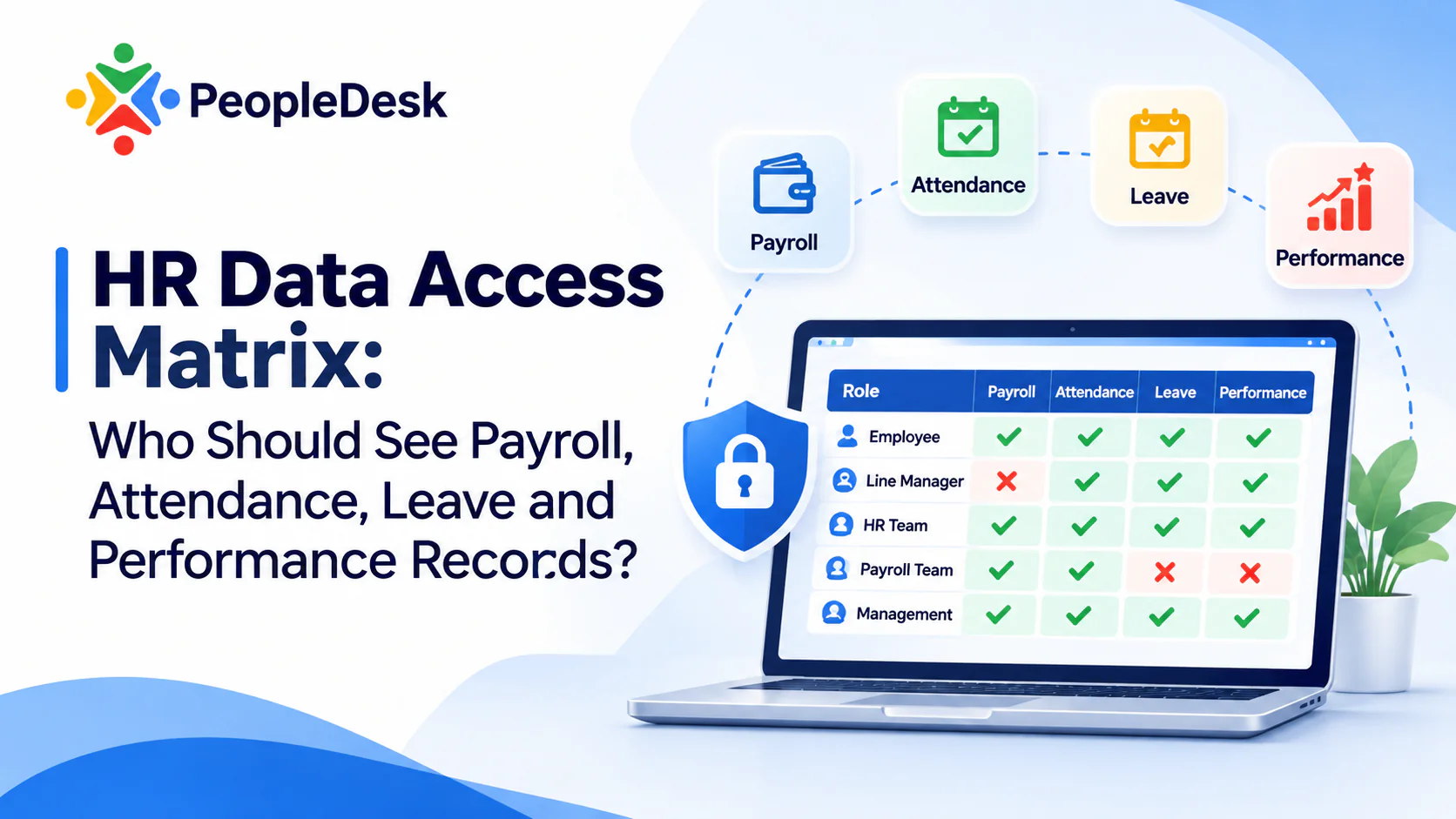
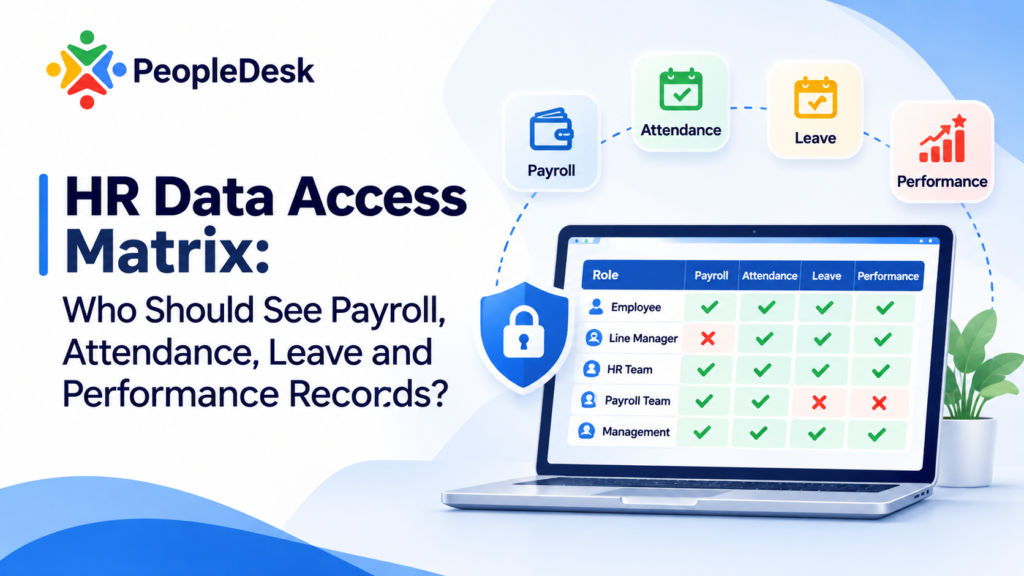
An HR data access matrix should answer three questions before anyone opens an employee record: who can access the data, what can they do with it, and whose data can they access?
That becomes important when payroll, attendance, leave and performance information all sit inside the same HR operation.
A line manager may need to review team attendance but should not automatically get access to employee salary details. Payroll may need finalized attendance inputs but not every performance comment. Leadership may need workforce trends without opening individual employee records.
PeopleDesk by AKIJ iBOS supports centralized HR operations across employee records, attendance, leave, payroll, performance management, employee self-service, approvals and reporting. But software alone does not decide the right access model. HR first needs a clear governance structure that defines which roles need which information.
This guide provides a practical HR data access matrix that HR teams can adapt for payroll, attendance, leave and performance records.
Why an HR Data Access Matrix Matters as Organizations Grow
HR information is rarely equally sensitive.
A shift supervisor may need to know whether an employee is present today.
The same supervisor may not need to know:
- the employee’s base salary;
- tax-related payroll details;
- bank-related payroll information;
- detailed performance calibration comments;
- sensitive supporting documents attached to a leave request.
As organizations grow, access becomes harder because several dimensions overlap:
Role: Employee, manager, HR, payroll, leadership, administrator.
Record type: Payroll, attendance, leave, performance, employee documents.
Action: View, create, edit, approve, report, export.
Scope: Own data, direct reports, assigned workplace, assigned business unit, payroll group or wider organization.
A good HR data access matrix defines all four rather than treating access as one broad permission.
This follows the same underlying logic as role-based access control. NIST defines role-based access control (RBAC) as controlling access through roles and the permissions associated with those roles, rather than assigning every permission independently to individual users.
The goal is not to restrict everyone.
The goal is to give each role enough access to perform its responsibilities without turning convenience into unnecessary visibility.
What an HR Data Access Matrix Should Define
An HR data access matrix maps roles against record categories and permitted actions.
The first mistake to avoid is treating “access” as one permission.
Viewing, editing and exporting are very different actions.
Permission Legend
| Code | Permission | Practical Meaning |
|---|---|---|
| V | View | Can see the permitted record or information |
| C | Create | Can initiate a record or request |
| E | Edit | Can change permitted information |
| A | Approve | Can approve or reject within an assigned workflow |
| R | Report | Can access relevant reports or dashboards |
| X | Export | Can export permitted information |
| O | Own | Limited to the user’s own information |
| T | Team | Limited to assigned/direct-report team |
| U | Unit | Limited to assigned workplace/business unit |
| G | Group | Limited to an assigned processing group |
| AGG | Aggregate | Summary or dashboard-level reporting |
Seeing a payslip is not the same as changing salary elements.
Viewing leave history is not the same as approving leave.
Running a dashboard is not the same as exporting a spreadsheet containing individual employee records.
This distinction should be explicit inside the HR data access matrix.
Access Should Follow Role, Scope and Business Need
Role alone does not solve access governance.
Two people may both be HR officers but be responsible for different workplaces or business units.
A manager may have authority over one team but not another.
A payroll officer may process one payroll group without needing visibility across the entire organization.
A useful access model therefore combines:
Role + Permission + Scope
This also aligns with the principle of least privilege. NIST SP 800-53 describes least privilege as allowing only the authorized access necessary to accomplish assigned organizational tasks.
For HR teams, the practical interpretation is straightforward:
If someone only needs aggregated reporting, do not automatically provide employee-level editing access.
If a manager only needs team attendance, do not automatically expose organization-wide attendance.
If payroll only needs finalized time inputs, payroll should not need control over the entire attendance workflow.
Sample HR Data Access Matrix by Role
The following matrix is a recommended starting framework, not a universal policy.
Every organization should adjust it based on responsibilities, internal policies and operational requirements.
| Role | Payroll | Attendance | Leave | Performance |
|---|---|---|---|---|
| Employee | V-O own outputs | V-O, C-O requests | V/C-O | V/C-O where applicable |
| Line Manager | Limited team inputs | V/A-T | V/A-T | V/C/A-T where assigned |
| HR Officer | Controlled V/E/R-U | V/E/R-U | V/E/R-U | V/E/R-U |
| HR Administrator | Policy/admin access as assigned | Policy/admin access | Policy/admin access | Cycle/configuration access |
| Payroll Officer | V/E/R/X-G as required | V/R-G finalized inputs | Limited payroll-impact view | Usually no routine need |
| Leadership | R-AGG | R-AGG | R-AGG | R-AGG |
| System/HRMS Administrator | Access administration | Access administration | Access administration | Access administration |
Two qualifications matter.
First, system administrators should not automatically be treated as ordinary HR record users simply because they administer the platform.
Second, roles are not enough by themselves. Scope matters just as much.
An HR officer responsible for one business unit should not automatically receive organization-wide access because the role says “HR.”
HR Data Access Matrix for Payroll Records
Payroll deserves some of the narrowest routine access in HR operations.
Payroll may contain salary structures, deductions, bonuses, tax-related records, bank outputs and other employee-specific financial information.
A practical HR data access matrix for payroll usually separates access among employees, payroll staff, HR, line managers and leadership.
Employees
Employees should be able to access their own payroll outputs that the organization makes available, such as payslips or salary-related documents.
That does not mean employees should be able to modify generated payroll records.
Payroll Team
Payroll staff need operational access to the employees or processing groups assigned to them.
Depending on responsibility, this may include salary elements, additions, deductions, bonuses, payroll processing, reporting and required outputs.
HR
Some HR roles may need visibility into compensation-related information for defined responsibilities, but the scope should follow their role and organizational responsibility.
Line Managers
Managers may need to validate operational inputs that affect payroll, such as approved overtime or attendance-related information.
That is different from giving them broad access to salary structures, tax details or payroll deductions.
Leadership
Leadership often needs payroll cost, headcount and workforce-cost reporting rather than routine access to individual salary editing.
The principle is simple:
If a summarized view answers the business question, individual record access may not be necessary.
For teams evaluating payroll governance alongside HRMS functionality, this HR and payroll software comparison provides additional context on what to review beyond payroll calculation alone.
HR Data Access Matrix for Attendance Records
Attendance information usually needs broader operational visibility than payroll.
Employees need to know whether their own attendance information is correct.
Supervisors need enough visibility to manage their teams.
HR needs operational control over attendance processing and approved corrections.
Payroll needs finalized attendance information where attendance affects salary processing.
Employee Access
Employees may need access to their own:
- attendance status;
- shift information;
- relevant punches or time records;
- attendance requests;
- overtime-related requests;
- approved corrections.
Manager Access
Managers typically need visibility into the attendance status of the team they are responsible for.
The important word is team.
A manager responsible for Warehouse A does not automatically need attendance visibility for every department in the organization.
HR Access
HR or time-management roles may need broader operational rights to review exceptions, process approved changes, manage shifts or support attendance administration within their assigned scope.
Payroll Access
Payroll usually needs the attendance result required for payroll processing rather than unrestricted control of the attendance process itself.
A healthier workflow is:
Attendance issue → Review/correction → Approval → Finalized attendance → Payroll input
That keeps responsibility clearer than allowing every downstream team to edit the source record.
HR Data Access Matrix for Leave and Movement Records
Leave records have two different information layers:
- The operational status of the leave.
- The supporting detail behind the leave.
Managers may need the first without always needing the second.
Employees
Employees should typically be able to see their own:
- leave balance;
- submitted requests;
- request status;
- relevant approval history.
Managers
A manager may need to know:
- when a team member will be absent;
- the requested dates;
- whether team coverage is affected;
- whether a request requires approval.
That does not automatically mean the manager needs every supporting document associated with the request.
HR
HR may need broader access to policies, balances, exceptions and administrative processing based on assigned responsibility.
Sensitive Supporting Information
Consider an employee who submits supporting documentation for a leave request.
The manager may need to know:
Approved leave: Monday to Wednesday.
The manager may not necessarily need every sensitive detail in the supporting document.
The HR data access matrix should distinguish leave status from supporting documentation instead of treating them as one permission.
HR Data Access Matrix for Performance Records
Performance information also has multiple sensitivity levels.
A KPI score is not the same thing as a manager’s narrative comment.
A final rating is not the same thing as a calibration discussion.
A development plan is not necessarily the same thing as leadership-level performance reporting.
Employees
Depending on organizational policy, employees may access their own:
- objectives or KPIs;
- self-assessment;
- assigned evaluation criteria;
- final performance outcome;
- development information made available to them.
Managers
Managers need access to the performance information for employees they are responsible for assessing.
That may include objectives, achievements, ratings and review workflows.
HR
HR typically needs administrative visibility for managing the performance cycle, criteria, timelines, evaluation workflows and reporting.
Leadership
Leadership may benefit more from:
- distribution trends;
- departmental performance summaries;
- calibration views;
- high-level performance reporting
than unrestricted access to every individual comment.
Detailed narrative comments deserve particular care.
A score may appear in summary reporting while the narrative supporting that score may require more limited access.
Common HR Data Access Control Mistakes
Most access problems do not begin with malicious intent.
They usually begin with convenience.
1. Giving Broad Admin Rights for One Small Task
Someone needs to complete one monthly process, so the organization grants broad administrative access.
The immediate problem disappears.
The unnecessary access remains.
2. Treating Export Rights Like View Rights
Exporting creates another copy of the data outside the controlled application view.
A user who needs to view a report does not automatically need to download all underlying employee records.
3. Using Shared Accounts
Shared accounts weaken individual accountability because several people can perform actions under the same identity.
4. Forgetting Access After Role Changes
Transfers, promotions and exits can change what someone needs to access.
Old permissions should not remain simply because nobody reviewed them.
5. Giving Managers More Detail Than Their Decision Requires
A manager may need enough information to make a decision without receiving every sensitive field behind the workflow.
Design access around the decision being made.
How Role-Based Access Control Works in an HRMS
A role-based HRMS model generally combines two layers:
Permission: What can this role do?
Scope: To which employees or organizational areas can it do it?
This is why an HRMS should not be evaluated by asking only:
“Does it have role permissions?”
A stronger question is:
“Can permissions be limited to the right organizational scope?”
PeopleDesk’s verified access model includes configurable roles and menu permissions together with organizational scope controls.
Its documented role patterns include:
- employees using their own records and requests;
- managers working with assigned team processes;
- HR roles operating within defined organizational scope;
- payroll roles working with assigned processing responsibilities;
- management receiving visibility based on granted access.
The exact configuration should follow each organization’s HR policy rather than relying on one default permission model.
How PeopleDesk Fits a Controlled HR Access Model
PeopleDesk brings employee records, attendance, leave and movement, payroll, performance management, employee self-service, approvals and reporting into one HRMS environment.
For an organization evaluating HR technology, that centralization can make access governance easier to structure than maintaining separate permissions across spreadsheets, folders and disconnected tools.
A practical PeopleDesk configuration can use roles and organizational scope to structure who sees which processes.
For example:
Employee: own records and supported self-service requests.
Manager: assigned team workflows and approvals.
HR: employee and HR-process visibility based on assigned organizational responsibility.
Payroll: salary-processing responsibilities based on assigned scope.
Management: workforce information based on granted reporting access.
When evaluating PeopleDesk HR software, do not ask only whether role permissions exist.
Ask the vendor to demonstrate one real access scenario.
For example:
“Can this branch manager approve leave for Branch A without receiving unnecessary access to payroll records from another branch?”
A live scenario reveals much more than a permissions screenshot.
Build the HR Data Access Matrix Before Configuring the HRMS
Before setting permissions in software, HR should create the access model outside the system first.
A practical sequence is:
- List the roles that genuinely exist in the organization.
- List the HR record categories each role interacts with.
- Separate view, create, edit, approve, report and export permissions.
- Define whether access applies to own, team, unit, processing-group or organization-level data.
- Identify sensitive exceptions such as payroll details, leave attachments and performance comments.
- Define approval responsibility separately from visibility.
- Review what happens when an employee transfers, changes role or leaves.
- Test the model using real HR scenarios before go-live.
This prevents the HRMS configuration from becoming the policy.
The policy should drive the configuration.
HR Data Access Matrix Checklist
Before approving the final matrix, ask:
- Can employees see only the records intended for self-service?
- Can managers access only the employees they are responsible for?
- Is payroll access separated from general manager access?
- Are editing and approval rights separated where appropriate?
- Are exports more restricted than normal viewing where needed?
- Are sensitive leave documents treated differently from leave status?
- Are performance comments more restricted than high-level performance reporting?
- Is organizational scope defined for HR users?
- Are access rights reconsidered after transfer or role changes?
- Can management get the information it needs without unnecessary employee-level access?
If these answers are unclear, the organization probably does not yet have an access-control problem solved by software.
It has an access-design problem waiting to appear inside the software.
FAQ
What is an HR data access matrix?
An HR data access matrix is a role-based framework that defines who can access different employee records, what actions they can perform, and which employee or organizational scope those permissions apply to.
Who should have access to payroll data?
Employees typically need access to their own payroll outputs, while payroll teams need processing access within their assigned responsibility. HR may need defined oversight access, and management can often work with summarized reporting instead of routine employee-level salary access.
Should line managers see employee attendance and leave information?
Managers generally need appropriate attendance and leave visibility for employees they are responsible for managing. The scope should be limited to the business purpose. Sensitive supporting information may require tighter access than attendance or leave status itself.
Should managers have access to employee salary information?
Not automatically. Managers may need to validate attendance, overtime or other inputs relevant to their team, but broader payroll visibility should depend on a clearly defined business requirement.
Who should see employee performance reviews?
Employees may access their own performance information according to policy, managers need access for employees they assess, HR needs administrative access for the performance process, and leadership may use higher-level reporting. Detailed calibration or narrative information can require narrower visibility.
How often should HR review access permissions?
There is no single review interval that fits every organization. At minimum, access should be reconsidered when responsibilities change, including joining, transfer, promotion, organizational restructuring or exit. Organizations can also define a periodic review cycle based on their own governance needs.
Make HR Access a Deliberate Decision
Good HR data access control does not mean hiding information from everyone.
It means making access intentional.
Payroll, attendance, leave and performance records serve different business purposes. The employee, manager, HR team, payroll team and leadership therefore should not automatically receive the same level of access to each one.
A practical HR data access matrix gives the organization a shared rule before those permissions are configured in the HRMS.
Build the matrix first.
Define permission and scope separately.
Then configure the HRMS around the way your organization actually works.
That is a stronger foundation than granting broad access first and trying to correct it after sensitive HR records have already been shared.
An HR data access control model should answer three questions before anyone opens an employee record: who can access the data, what can they do with it, and whose data can they access?
That sounds simple until payroll, attendance, leave and performance information all sit inside the same HR operation.
A line manager may need to review team attendance but should not automatically get access to employee salary details. Payroll may need finalized attendance inputs but not every performance comment. Leadership may need workforce trends without opening individual employee records.
This is where an HR data access matrix becomes useful.
PeopleDesk by AKIJ iBOS supports centralized HR operations across employee records, attendance, leave, payroll, performance management, employee self-service, approvals and reporting. But software alone does not decide the right access model. HR first needs a clear governance structure that defines which roles need which information.
This guide provides a practical matrix HR teams can adapt for that purpose.
Why HR Data Access Control Gets Harder as Organizations Grow
HR information is rarely equally sensitive.
A shift supervisor may need to know whether an employee is present today.
The same supervisor may not need to know:
- the employee’s base salary;
- tax-related payroll details;
- bank-related payroll information;
- detailed performance calibration comments;
- sensitive supporting documents attached to a leave request.
As organizations grow, access becomes harder because several dimensions start overlapping:
Role: Employee, manager, HR, payroll, leadership, administrator.
Record type: Payroll, attendance, leave, performance, employee documents.
Action: View, create, edit, approve, report, export.
Scope: Own data, direct reports, assigned workplace, assigned business unit, payroll group or wider organization.
Weak HR data access control usually happens when one of these dimensions is ignored.
For example, giving someone “HR access” without defining organizational scope can expose far more information than their job actually requires.
The goal is not to restrict everyone.
The goal is to give each role enough access to do its work without turning convenience into unnecessary visibility.
What an HR Data Access Matrix Should Define
An HR data access matrix maps roles against record categories and permitted actions.
The first mistake to avoid is treating “access” as one permission.
Viewing, editing and exporting are very different actions.
Permission Legend
| Code | Permission | Practical Meaning |
|---|---|---|
| V | View | Can see the approved record or information |
| C | Create | Can initiate a record or request |
| E | Edit | Can change permitted information |
| A | Approve | Can approve or reject within an assigned workflow |
| R | Report | Can access relevant reports or dashboards |
| X | Export | Can export permitted information |
| O | Own | Limited to the user’s own information |
| T | Team | Limited to assigned/direct-report team |
| U | Unit | Limited to assigned workplace/business unit |
| G | Group | Limited to an assigned processing group |
| AGG | Aggregate | Summary or dashboard-level reporting |
A user who can view payroll should not automatically be allowed to edit payroll.
A manager who can approve leave should not automatically be able to open every supporting document.
And someone who can run a workforce report does not automatically need the ability to export employee-level records.
That distinction is the foundation of effective HR data access control.
A Practical HR Data Access Matrix by Role
The following matrix is a recommended starting framework, not a universal policy.
Every organization should adjust it based on responsibilities, internal policies and operational requirements.
| Role | Payroll | Attendance | Leave | Performance |
|---|---|---|---|---|
| Employee | V-O own outputs | V-O, C-O requests | V/C-O | V/C-O where applicable |
| Line Manager | Limited team inputs | V/A-T | V/A-T | V/C/A-T where assigned |
| HR Officer | Controlled V/E/R-U | V/E/R-U | V/E/R-U | V/E/R-U |
| HR Administrator | Policy/admin access as assigned | Policy/admin access | Policy/admin access | Cycle/configuration access |
| Payroll Officer | V/E/R/X-G as required | V/R-G finalized inputs | Limited payroll-impact view | Usually no routine need |
| Leadership | R-AGG | R-AGG | R-AGG | R-AGG |
| System/HRMS Administrator | Configuration/access administration | Configuration/access administration | Configuration/access administration | Configuration/access administration |
Two qualifications matter.
First, system administrators should not automatically be treated as ordinary HR record users simply because they administer the platform. Their actual content visibility should follow the organization’s assigned permissions.
Second, roles are not enough by themselves. Scope matters just as much.
An HR officer responsible for one business unit should not automatically receive organization-wide access because the role says “HR.”
Who Should See Payroll Records?
Payroll deserves some of the narrowest routine access in HR operations.
The reason is straightforward. Payroll can include salary structures, deductions, bonuses, tax-related records, bank outputs and other employee-specific financial information.
A practical access pattern usually looks like this:
Employees
Employees should be able to access their own payroll outputs that the organization makes available, such as payslips or salary-related documents.
That does not mean employees can modify generated payroll records.
Payroll Team
Payroll staff need operational access to the employees or processing groups assigned to them.
Depending on responsibility, this may include salary elements, additions, deductions, bonuses, payroll processing, reporting and required outputs.
HR
Some HR roles may need visibility into compensation-related information for defined responsibilities, but the scope should follow their role and organizational responsibility.
Line Managers
Managers may need to validate operational inputs that affect payroll, such as approved overtime or attendance-related information.
That is different from giving them broad access to salary structures, tax details or payroll deductions.
Leadership
Leadership often needs payroll cost, headcount and workforce-cost reporting rather than routine access to individual salary editing.
The principle is simple:
If a summarized view answers the business question, individual record access may not be necessary.
For teams evaluating systems specifically around payroll governance, this broader HR and payroll software comparison can also help frame what to review beyond payroll calculation alone.
Who Should See Attendance and Time Records?
Attendance information usually needs broader operational visibility than payroll.
Employees need to know whether their own attendance information is correct.
Supervisors need enough visibility to manage their teams.
HR needs operational control over attendance processing and approved corrections.
Payroll needs finalized attendance information where attendance affects salary processing.
Employee Access
Employees may need access to their own:
- attendance status;
- shift information;
- relevant punches or time records;
- attendance requests;
- overtime-related requests;
- approved corrections.
Manager Access
Managers typically need visibility into the attendance status of the team they are responsible for.
The key word is team.
A manager responsible for Warehouse A does not automatically need attendance visibility for every department in the company.
HR Access
HR or time-management roles may need broader operational rights to review exceptions, process approved changes, manage shifts or support attendance administration within their assigned scope.
Payroll Access
Payroll usually needs the attendance result required for payroll processing rather than unrestricted control of the attendance process itself.
This separation becomes important at month-end.
If payroll is changing attendance simply because a salary output looks wrong, the organization has blurred ownership between two processes.
A better model is:
Attendance issue → review/correction → approval → finalized attendance → payroll input
Who Should See Leave and Movement Records?
Leave records have two different information layers:
- The operational status of the leave.
- The supporting detail behind the leave.
Managers may need the first without always needing the second.
Employees
Employees should typically be able to see their own:
- leave balance;
- submitted requests;
- request status;
- relevant approval history.
Managers
A manager may need to know:
- when a team member will be absent;
- the requested dates;
- whether coverage is affected;
- whether a request requires approval.
That does not necessarily mean the manager needs every supporting document associated with the request.
HR
HR may need broader access to policies, balances, exceptions and administrative processing based on assigned responsibility.
Sensitive Supporting Information
This is where HR data access control should become more granular.
Consider an employee who submits supporting documentation for a leave request.
The manager may need to know:
Approved leave: Monday to Wednesday.
The manager may not necessarily need access to all sensitive details in the supporting document.
Organizations should decide this explicitly instead of allowing the software’s broadest available permission to become the default policy.
Who Should See Performance Records?
Performance information also has multiple sensitivity levels.
A KPI score is not the same thing as a manager’s narrative comment.
A final rating is not the same thing as a calibration discussion.
A development plan is not necessarily the same thing as leadership-level performance reporting.
Employees
Depending on organizational policy, employees may access their own:
- objectives or KPIs;
- self-assessment;
- assigned evaluation criteria;
- final performance outcome;
- development information made available to them.
Managers
Managers need access to the performance information for employees they are responsible for assessing.
That may include objectives, achievements, ratings and review workflows.
HR
HR typically needs administrative visibility for managing the performance cycle, criteria, timelines, evaluation workflows and reporting.
Leadership
Leadership may benefit more from:
- distribution trends;
- departmental performance summaries;
- calibration views;
- high-level performance reporting
than unrestricted access to every manager comment.
Detailed narrative comments deserve particular care.
A score may be used in a summary report while the narrative supporting that score may require more limited access.
Five HR Data Access Control Mistakes to Avoid
Most access problems do not start with malicious intent.
They usually start with convenience.
1. Giving Broad Admin Rights for One Small Task
Someone needs to complete one monthly process, so the organization gives them broad administrative access.
The short-term problem is solved.
The long-term access risk remains.
2. Treating Export Rights Like View Rights
Exporting data creates a new copy outside the controlled screen.
An employee who needs to view a report does not automatically need to download all underlying employee records.
3. Using Shared Accounts
Shared access makes accountability difficult.
If several people use one account, it becomes harder to establish who performed an action.
4. Forgetting Access After Role Changes
Transfers, promotions and exits can change what a user needs to see.
Old access should not remain indefinitely simply because nobody reviewed it.
5. Giving Managers More Detail Than Their Decision Requires
A manager may need to approve an action without seeing every sensitive field behind that action.
Design the access around the decision being made.
Role-Based Access Control in an HRMS
A role-based HRMS model generally combines two layers:
Permission: What can this role do?
Scope: To which employees or organizational areas can it do it?
That distinction is important.
PeopleDesk’s verified access model includes configurable roles and menu permissions, together with organizational scope controls. Standard documented role patterns include employees using their own records and requests, managers working with assigned team processes, HR roles working within defined organizational scope, payroll roles working with assigned processing responsibilities, and management access based on granted visibility.
That means organizations can design access around operational responsibility instead of treating the whole HRMS as one permission set.
But the software configuration should follow a documented HR policy.
HR should decide the model first.
The system should enforce it second.
How PeopleDesk Fits a Controlled HR Access Model
PeopleDesk brings employee records, attendance, leave and movement, payroll, performance management, employee self-service, approvals and reporting into one HRMS environment.
For an organization reviewing best HR software in Bangladesh, this centralization matters because access does not have to be designed separately across multiple spreadsheets, folders and disconnected HR tools.
A practical PeopleDesk setup can use roles and organizational scope to structure who sees which HR processes.
For example:
Employee: own records and supported self-service requests.
Manager: assigned team workflows and approvals.
HR: employee and HR-process visibility based on assigned organizational responsibility.
Payroll: salary-processing responsibilities based on assigned scope.
Management: workforce information based on granted reporting access.
When evaluating PeopleDesk HR software, do not ask only whether the system has role permissions.
Ask the vendor to demonstrate one real access scenario.
For example:
“Can this branch manager approve leave for Branch A without seeing employee payroll records from Branch B?”
A live scenario reveals much more than a permissions screenshot.
Build the Matrix Before Configuring the HRMS
Before setting permissions in software, HR should create the access model outside the system first.
A practical sequence is:
- List the roles that genuinely exist in the organization.
- List the HR record categories each role interacts with.
- Separate view, create, edit, approve, report and export permissions.
- Define whether access applies to own, team, unit, processing-group or organization-level data.
- Identify sensitive exceptions such as payroll details, leave attachments and performance comments.
- Define approval responsibility separately from visibility.
- Review what happens when an employee transfers, changes role or leaves.
- Test the model using real HR scenarios before going live.
This prevents the HRMS configuration from becoming the policy.
The policy should drive the configuration.
HR Data Access Control Checklist
Before approving your matrix, ask:
- Can employees see only the records intended for self-service?
- Can managers access only the employees they are responsible for?
- Is payroll access separated from general manager access?
- Are editing and approval rights separated where needed?
- Are exports more restricted than normal viewing?
- Are sensitive leave documents treated differently from leave status?
- Are performance comments more restricted than high-level performance reporting?
- Is organizational scope defined for HR users?
- Are access changes reviewed after transfer or role changes?
- Can management get the information it needs without unrestricted employee-level access?
If HR cannot answer these clearly, the organization probably does not yet have an access-control problem solved by software.
It has an access-design problem waiting to appear inside the software.
FAQ
What is an HR data access matrix?
An HR data access matrix is a role-based framework that defines who can access different employee records, what actions they can perform, and which employee or organizational scope those permissions apply to.
Who should have access to payroll data?
Employees typically need access to their own payroll outputs, while payroll teams need processing access within their assigned responsibility. HR may need defined oversight access, and management can often work with summarized reporting instead of routine employee-level salary access.
Should line managers see employee attendance and leave information?
Managers generally need appropriate attendance and leave visibility for employees they are responsible for managing. The scope should be limited to the business purpose. Sensitive supporting information may require tighter access than attendance or leave status itself.
Should managers have access to employee salary information?
Not automatically. Managers may need to validate attendance, overtime or other inputs relevant to their team, but broad payroll visibility should depend on a clearly defined business requirement.
Who should see employee performance reviews?
Employees may access their own performance information according to policy, managers need access for employees they assess, HR needs administrative access for the performance process, and leadership may use higher-level reporting. Detailed calibration or narrative information can require narrower visibility.
How often should HR review access permissions?
There is no single review interval that fits every organization. At minimum, access should be reconsidered when responsibilities change, including joining, transfer, promotion, organizational restructuring or exit. Organizations can also define a periodic review cycle based on their own governance needs.
Make HR Access a Deliberate Decision
Good HR data access control does not mean hiding information from everyone.
It means making access intentional.
Payroll, attendance, leave and performance records serve different business purposes. The employee, manager, HR team, payroll team and leadership therefore should not automatically receive the same level of access to each one.
Build the matrix first.
Define permission and scope separately.
Then configure the HRMS around the way your organization actually works.
That is a stronger foundation than giving broad access first and trying to correct it after sensitive HR records have already been shared.